> ## Documentation Index
> Fetch the complete documentation index at: https://intunedhq.com/docs/llms.txt
> Use this file to discover all available pages before exploring further.
# Usage and billing
> View consumption metrics, set limits, and manage invoices
## Overview
Intuned charges a fixed monthly plan cost plus pay-as-you-go for usage beyond your plan limits. Billing happens on the 1st of each month.
Two pages help you monitor and control spending:
* **[Usage](https://app.intuned.io/usage)** — Track consumption metrics
* **[Billing](https://app.intuned.io/billing)** — Manage payments, limits, and invoices
## Check your usage
Go to [app.intuned.io/usage](https://app.intuned.io/usage) to see your consumption for the current billing period.
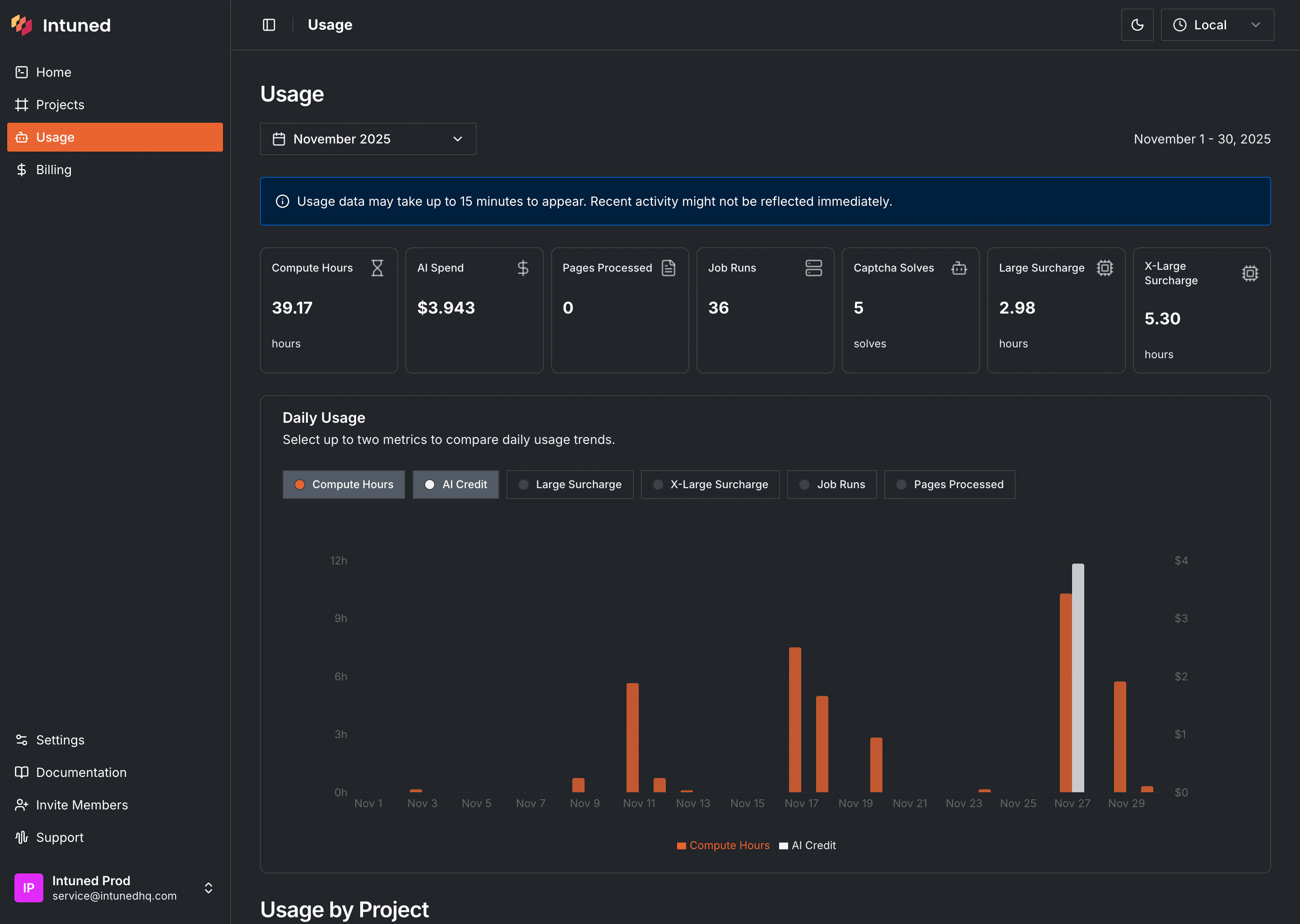 The page shows:
* **Usage breakdown** — Each metric with current consumption (in usage units, not dollars)
* **Daily usage chart** — Compare two metrics over time to spot patterns or spikes
* **Project breakdown** — Which projects are consuming the most resources
To see dollar amounts and overage costs, go to the [Billing page](https://app.intuned.io/billing).
### IntunedAgent usage
The **IntunedAgent** project tracks usage from Intuned Agent tasks (creating, updating, or fixing projects). This includes AI spend for generated code, compute hours for running task APIs, and any captcha solves during web interactions.
## Bring your own key (BYOK)
Use BYOK to bill AI spend to your own account instead of through Intuned.
Set it up at [app.intuned.io/settings/own-keys](https://app.intuned.io/settings/own-keys), or go to `Settings > Own Keys`.
Supported keys:
* Anthropic
* OpenAI
When you add a key:
* AI requests use your key instead of Intuned's
* Those requests don't count toward your Intuned AI spend or credits
* This applies across the platform, including Intuned Agent and AI SDK methods used in your projects
BYOK only changes AI billing. Compute hours, job runs, captcha solves, and other usage metrics still follow your plan.
For Intuned Agent or Web Tasks, add an Anthropic key. If you remove a key later, those requests fall back to Intuned billing.
## Set usage limits
By default, Intuned doesn't block usage when you exceed plan limits—it charges overages. To avoid unexpected costs, set hard limits on specific metrics.
1. Go to the [Billing page](https://app.intuned.io/billing).
2. In the usage table, find the metric and select ****.
3. Enter your limit value and select **Save Changes**.
The page shows:
* **Usage breakdown** — Each metric with current consumption (in usage units, not dollars)
* **Daily usage chart** — Compare two metrics over time to spot patterns or spikes
* **Project breakdown** — Which projects are consuming the most resources
To see dollar amounts and overage costs, go to the [Billing page](https://app.intuned.io/billing).
### IntunedAgent usage
The **IntunedAgent** project tracks usage from Intuned Agent tasks (creating, updating, or fixing projects). This includes AI spend for generated code, compute hours for running task APIs, and any captcha solves during web interactions.
## Bring your own key (BYOK)
Use BYOK to bill AI spend to your own account instead of through Intuned.
Set it up at [app.intuned.io/settings/own-keys](https://app.intuned.io/settings/own-keys), or go to `Settings > Own Keys`.
Supported keys:
* Anthropic
* OpenAI
When you add a key:
* AI requests use your key instead of Intuned's
* Those requests don't count toward your Intuned AI spend or credits
* This applies across the platform, including Intuned Agent and AI SDK methods used in your projects
BYOK only changes AI billing. Compute hours, job runs, captcha solves, and other usage metrics still follow your plan.
For Intuned Agent or Web Tasks, add an Anthropic key. If you remove a key later, those requests fall back to Intuned billing.
## Set usage limits
By default, Intuned doesn't block usage when you exceed plan limits—it charges overages. To avoid unexpected costs, set hard limits on specific metrics.
1. Go to the [Billing page](https://app.intuned.io/billing).
2. In the usage table, find the metric and select ****.
3. Enter your limit value and select **Save Changes**.
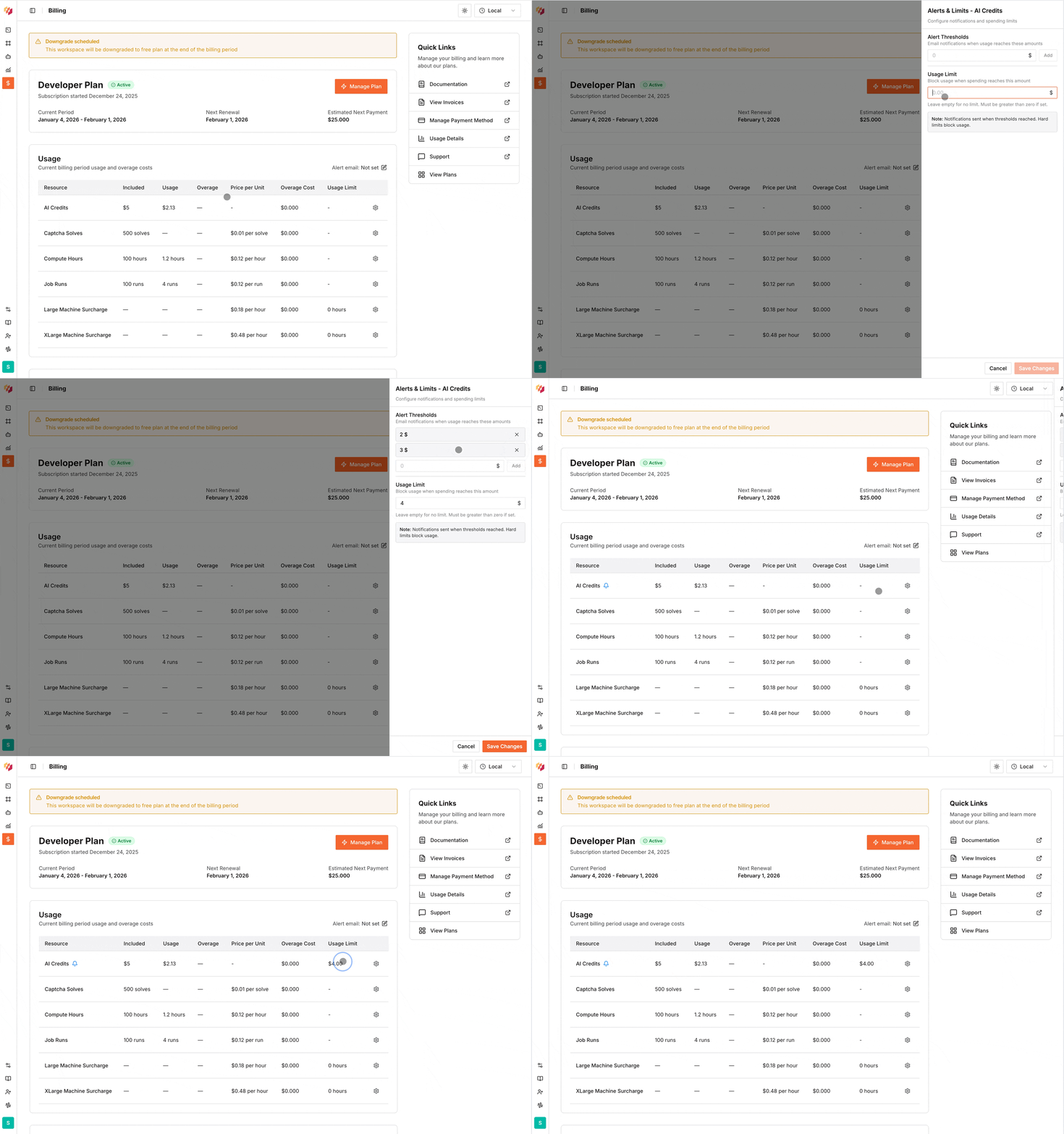 When you hit a limit, further consumption of that resource is blocked until the next billing cycle.
### Configure alerts
Get notified before hitting limits:
1. In the usage table, find the metric and select ****.
2. Enter the threshold value for notifications.
3. Select **Save Changes**.
Change the workspace alert email in the usage table to forward alerts to a different address.
## Change your plan
Go to the [Billing page](https://app.intuned.io/billing) to upgrade or downgrade.
**Upgrades** take effect immediately. Your invoice includes a prorated charge for the new plan, a credit for unused time on your current plan, and any overages up to the upgrade date.
**Downgrades** take effect at the start of the next billing cycle. Any overages from the current cycle are billed normally.
To cancel your subscription, downgrade to the Free plan.
For Enterprise plans with custom limits and pricing, [contact our team](https://cal.com/team/intuned/get-started).
See the [Plans reference](/main/05-references/plans-and-billing) for plan details and pricing.
## View invoices and manage payment
From the [Billing page](https://app.intuned.io/billing), you can:
* View expected charges for the next billing cycle (including projected overages)
* Download past invoices
* Add or update payment methods
Unpaid invoices display a warning with the amount due.
## Free plan
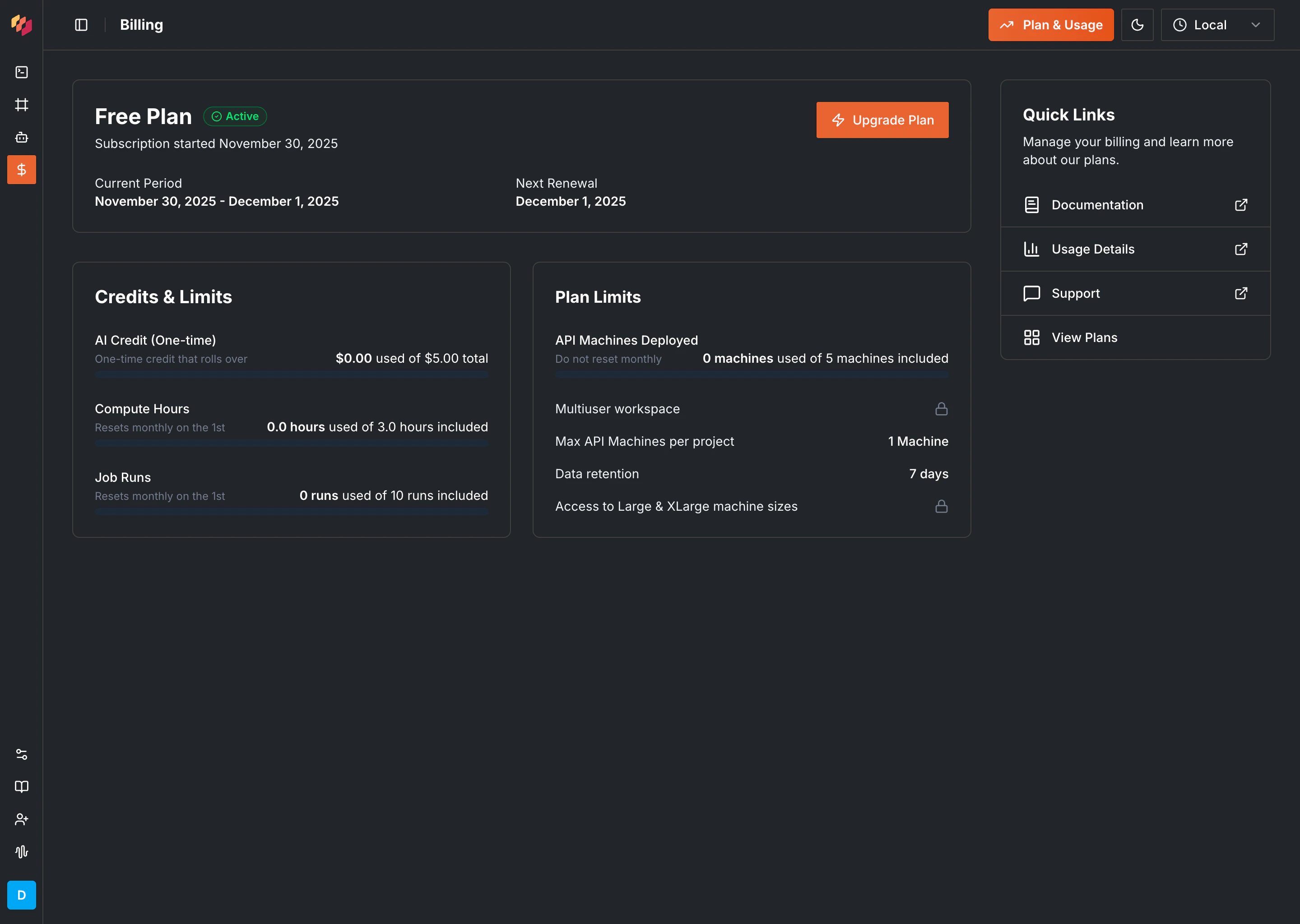
The Free plan lets you explore Intuned without payment information. It includes limited resources with hard limits—no overages. Once you hit limits, upgrade to continue.
Eligible accounts receive a one-time \$5 AI credit at signup to explore Agent and SDK features. Eligibility is determined during account creation to prevent abuse. Credits are granted automatically—no action required. If your account is not eligible, you can [bring your own API key](/main/02-features/usage-pricing-monitoring-alerting#bring-your-own-key-byok) to use AI features without interruption.
When you hit a limit, further consumption of that resource is blocked until the next billing cycle.
### Configure alerts
Get notified before hitting limits:
1. In the usage table, find the metric and select ****.
2. Enter the threshold value for notifications.
3. Select **Save Changes**.
Change the workspace alert email in the usage table to forward alerts to a different address.
## Change your plan
Go to the [Billing page](https://app.intuned.io/billing) to upgrade or downgrade.
**Upgrades** take effect immediately. Your invoice includes a prorated charge for the new plan, a credit for unused time on your current plan, and any overages up to the upgrade date.
**Downgrades** take effect at the start of the next billing cycle. Any overages from the current cycle are billed normally.
To cancel your subscription, downgrade to the Free plan.
For Enterprise plans with custom limits and pricing, [contact our team](https://cal.com/team/intuned/get-started).
See the [Plans reference](/main/05-references/plans-and-billing) for plan details and pricing.
## View invoices and manage payment
From the [Billing page](https://app.intuned.io/billing), you can:
* View expected charges for the next billing cycle (including projected overages)
* Download past invoices
* Add or update payment methods
Unpaid invoices display a warning with the amount due.
## Free plan
The Free plan lets you explore Intuned without payment information. It includes limited resources with hard limits—no overages. Once you hit limits, upgrade to continue.
Eligible accounts receive a one-time \$5 AI credit at signup to explore Agent and SDK features. Eligibility is determined during account creation to prevent abuse. Credits are granted automatically—no action required. If your account is not eligible, you can [bring your own API key](/main/02-features/usage-pricing-monitoring-alerting#bring-your-own-key-byok) to use AI features without interruption.
 ## Usage metrics reference
| Metric | What it measures |
| -------------------------- | ------------------------------------------------------------------------------------------------------------------------------------------------------------------------ |
| Compute hours | Time your machine workers spend executing APIs and JobRuns |
| AI spend | Dollars spent on AI processing from AI SDK methods and Intuned Agent tasks billed through Intuned. Requests sent with your own provider key don't count toward AI spend. |
| JobRuns | Number of JobRuns executed |
| Captcha solves | Captcha challenges solved ([details](/main/02-features/stealth-mode-captcha-solving-proxies)) |
| Large machines surcharge | Additional hours for large machine types |
| X-Large machines surcharge | Additional hours for extra-large machine types |
| Pages processed | PDF pages processed through Intuned's PDF capabilities |
Large and X-Large machine surcharges can lead to significant overage charges on Developer and Startup plans.
## Workspace limits
Your plan determines workspace constraints beyond usage metrics:
* Maximum concurrent machines
* Maximum machines per project
* Data retention period
* Access to large/x-large machine types
View your current limits on the [Billing page](https://app.intuned.io/billing).
## FAQs
Billing cycles start on the 1st of every month. Your plan fee is charged along with any overages from the previous month.
Overages are usage beyond your plan limits, charged at per-unit rates. See the [Plans reference](/main/05-references/plans-and-billing) for rates.
No. Unused plan allowances don't roll over and aren't refundable.
Visit the [Billing page](https://app.intuned.io/billing) and select **Manage Payment Methods** to see options for your region.
## Related resources
Plan features and pricing details
Configure workspace settings
## Usage metrics reference
| Metric | What it measures |
| -------------------------- | ------------------------------------------------------------------------------------------------------------------------------------------------------------------------ |
| Compute hours | Time your machine workers spend executing APIs and JobRuns |
| AI spend | Dollars spent on AI processing from AI SDK methods and Intuned Agent tasks billed through Intuned. Requests sent with your own provider key don't count toward AI spend. |
| JobRuns | Number of JobRuns executed |
| Captcha solves | Captcha challenges solved ([details](/main/02-features/stealth-mode-captcha-solving-proxies)) |
| Large machines surcharge | Additional hours for large machine types |
| X-Large machines surcharge | Additional hours for extra-large machine types |
| Pages processed | PDF pages processed through Intuned's PDF capabilities |
Large and X-Large machine surcharges can lead to significant overage charges on Developer and Startup plans.
## Workspace limits
Your plan determines workspace constraints beyond usage metrics:
* Maximum concurrent machines
* Maximum machines per project
* Data retention period
* Access to large/x-large machine types
View your current limits on the [Billing page](https://app.intuned.io/billing).
## FAQs
Billing cycles start on the 1st of every month. Your plan fee is charged along with any overages from the previous month.
Overages are usage beyond your plan limits, charged at per-unit rates. See the [Plans reference](/main/05-references/plans-and-billing) for rates.
No. Unused plan allowances don't roll over and aren't refundable.
Visit the [Billing page](https://app.intuned.io/billing) and select **Manage Payment Methods** to see options for your region.
## Related resources
Plan features and pricing details
Configure workspace settings