> ## Documentation Index
> Fetch the complete documentation index at: https://intunedhq.com/docs/llms.txt
> Use this file to discover all available pages before exploring further.
# n8n
## Overview
[n8n](https://n8n.io/) is a workflow automation platform that connects services through a visual interface.
This guide walks you through integrating Intuned with n8n. You'll build a sales email workflow that crawls company websites and generates personalized outreach using AI—demonstrating how to call Intuned APIs from n8n workflows.
This guide assumes you're familiar with n8n basics. If you're new to Intuned, start with the [getting started guide](/main/00-getting-started/introduction).
## Prerequisites
Before you begin, ensure you have the following:
* An [Intuned account](https://app.intuned.io) with API credentials
* An n8n instance (cloud or self-hosted)
* The [crawl4ai project](https://github.com/Intuned/cookbook) deployed to your workspace
* An OpenAI API key
* A Gmail account for sending emails
## What you can build
n8n + Intuned unlocks workflows that combine browser automation with hundreds of other services:
* **Sales outreach** — Crawl prospect websites, generate personalized emails with AI, send via Gmail or Outlook
* **Lead enrichment** — Scrape company pages for contact info and push directly to your CRM
* **Market research** — Monitor competitor pricing, store in Airtable or Google Sheets, alert on Slack when prices change
* **Content monitoring** — Watch pages for updates, extract changes, notify your team
This guide demonstrates a basic sales outreach pattern. The same approach applies to any workflow that needs browser automation as part of a larger process.
## Guide
### 1. Get your Intuned API credentials
1. Go to [app.intuned.io](https://app.intuned.io)
2. Navigate to **Settings** > **API Keys**
3. Create a new API key or use an existing one
4. Find your **Workspace ID** in [Workspace management](/main/03-how-to/manage/manage-workspace)
You'll use these credentials in the n8n HTTP Request nodes.
### 2. Import the n8n workflow
The example workflow demonstrates a complete automation pipeline: collecting form inputs, crawling a company website, generating a personalized sales email with AI, and sending it via Gmail.
```json theme={null}
{
"name": "Draft Sale Email Generator",
"nodes": [
{
"parameters": {
"formTitle": "Sales Email Generator",
"formDescription": "Fill in the details to generate a personalized sales email",
"formFields": {
"values": [
{
"fieldLabel": "What are you selling?"
},
{
"fieldLabel": "Target company website"
},
{
"fieldLabel": "Job title (e.g., VP Engineering)"
},
{
"fieldLabel": "Your email address",
"fieldType": "email"
},
{
"fieldLabel": "Your name"
},
{
"fieldLabel": "Recipient email address",
"fieldType": "email"
},
{
"fieldLabel": "Recipient name (if known)"
}
]
},
"options": {}
},
"id": "42df4827-de81-4c1e-9043-4ece0f1ad715",
"name": "Sales Email Form",
"type": "n8n-nodes-base.formTrigger",
"typeVersion": 2.3,
"position": [
784,
-560
]
},
{
"parameters": {
"mode": "runOnceForEachItem",
"jsCode": "return {\n json: {\n api: \"simple-crawl\",\n parameters: {\n url: $input.item.json[\"Target company website\"]\n }\n }\n};"
},
"type": "n8n-nodes-base.code",
"typeVersion": 2,
"position": [
1024,
-560
],
"id": "146a90b7-9dc0-428b-9f53-c349ace77740",
"name": "Build Crawl Request"
},
{
"parameters": {
"amount": 120
},
"type": "n8n-nodes-base.wait",
"typeVersion": 1.1,
"position": [
1456,
-560
],
"id": "7fa57cdb-a698-4678-945f-c8217b410ecf",
"name": "Wait"
},
{
"parameters": {
"method": "POST",
"url": "https://app.intuned.io/api/v1/workspace/YOUR_WORKSPACE_ID/projects/crawl4ai/run/start",
"sendHeaders": true,
"headerParameters": {
"parameters": [
{
"name": "x-api-key",
"value": "YOUR_API_KEY"
}
]
},
"sendBody": true,
"bodyParameters": {
"parameters": [
{
"name": "api",
"value": "={{ $json.api }}"
},
{
"name": "parameters",
"value": "={{ $json.parameters }}"
}
]
},
"options": {}
},
"type": "n8n-nodes-base.httpRequest",
"typeVersion": 4.3,
"position": [
1248,
-560
],
"id": "528accaf-0869-42b4-941e-d40c1ba1fe67",
"name": "Crawl"
},
{
"parameters": {
"url": "=https://app.intuned.io/api/v1/workspace/YOUR_WORKSPACE_ID/projects/crawl4ai/run/{{ $json.runId }}/result/",
"sendHeaders": true,
"headerParameters": {
"parameters": [
{
"name": "x-api-key",
"value": "YOUR_API_KEY"
}
]
},
"options": {}
},
"type": "n8n-nodes-base.httpRequest",
"typeVersion": 4.3,
"position": [
1664,
-560
],
"id": "7af2b444-fe16-4efb-aa06-f1c55b8fdf10",
"name": "Get Crawl Result"
},
{
"parameters": {
"modelId": {
"__rl": true,
"value": "chatgpt-4o-latest",
"mode": "list",
"cachedResultName": "CHATGPT-4O-LATEST"
},
"responses": {
"values": [
{
"content": "=You are a sales email expert. Generate a personalized sales email based on the following information:\n\nPRODUCT I'M SELLING:\n{{ $('Sales Email Form').item.json[\"What are you selling?\"] }}\n\nTARGET COMPANY INFO (from their website):\n{{ $('Get Crawl Result').item.json.result.markdown }}\n\nRECIPIENT:\nJob Title: {{ $('Sales Email Form').item.json[\"Job title (e.g., VP Engineering)\"] }}\nName: {{ $('Sales Email Form').item.json[\"Recipient name (if known)\"] || \"there\" }}\n\nINSTRUCTIONS:\n- Write a professional, personalized sales email\n- Reference specific information from their website to show you've done research\n- Keep it under 150 words\n- Include a clear call-to-action\n- Use a friendly but professional tone\n- Output ONLY the email (subject line + body), no additional commentary\n\nFormat:\nSubject: [subject line]\n\n[email body]"
}
]
},
"builtInTools": {},
"options": {}
},
"type": "@n8n/n8n-nodes-langchain.openAi",
"typeVersion": 2.1,
"position": [
1872,
-560
],
"id": "09914554-a754-4df0-8df7-b095997e8ed7",
"name": "Message a model",
"credentials": {
"openAiApi": {
"id": "YOUR_OPENAI_CREDENTIAL_ID",
"name": "OpenAi account"
}
}
},
{
"parameters": {
"mode": "runOnceForEachItem",
"jsCode": "// Get the AI-generated email\nconst aiResponse = $input.item.json.output[0].content[0].text\n\n// Split into subject and body\nconst lines = aiResponse.trim().split('\\n');\nlet subject = '';\nlet body = '';\n\n// Find subject line\nconst subjectLine = lines.find(line => line.toLowerCase().startsWith('subject:'));\nif (subjectLine) {\n subject = subjectLine.replace(/^subject:\\s*/i, '').trim();\n \n // Get body (everything after subject, skip empty lines)\n const subjectIndex = lines.indexOf(subjectLine);\n body = lines.slice(subjectIndex + 1)\n .filter(line => line.trim().length > 0)\n .join('\\n')\n .trim();\n} else {\n // If no subject found, use first line as subject\n subject = lines[0];\n body = lines.slice(1).join('\\n').trim();\n}\n\n// Get form data\nconst formData = $('Sales Email Form').item.json;\n\nreturn {\n json: {\n subject: subject,\n body: body,\n to: formData[\"Recipient email address\"],\n from: formData[\"Your email address\"],\n senderName: formData[\"Your name\"],\n fullEmail: aiResponse // Keep full email for debugging\n }\n};"
},
"type": "n8n-nodes-base.code",
"typeVersion": 2,
"position": [
2224,
-560
],
"id": "1469cadf-5e84-41e6-b5c9-4d4117e5f77e",
"name": "Parse Email"
},
{
"parameters": {
"sendTo": "={{ $json.to }}",
"subject": "={{ $json.subject }}",
"emailType": "text",
"message": "={{ $json.fullEmail }}",
"options": {}
},
"type": "n8n-nodes-base.gmail",
"typeVersion": 2.2,
"position": [
2448,
-560
],
"id": "4bf8db92-7bef-4eb6-9870-54920081ef15",
"name": "Send a message",
"credentials": {
"gmailOAuth2": {
"id": "YOUR_GMAIL_CREDENTIAL_ID",
"name": "Gmail account"
}
}
}
],
"pinData": {},
"connections": {
"Sales Email Form": {
"main": [
[
{
"node": "Build Crawl Request",
"type": "main",
"index": 0
}
]
]
},
"Build Crawl Request": {
"main": [
[
{
"node": "Crawl",
"type": "main",
"index": 0
}
]
]
},
"Wait": {
"main": [
[
{
"node": "Get Crawl Result",
"type": "main",
"index": 0
}
]
]
},
"Crawl": {
"main": [
[
{
"node": "Wait",
"type": "main",
"index": 0
}
]
]
},
"Get Crawl Result": {
"main": [
[
{
"node": "Message a model",
"type": "main",
"index": 0
}
]
]
},
"Message a model": {
"main": [
[
{
"node": "Parse Email",
"type": "main",
"index": 0
}
]
]
},
"Parse Email": {
"main": [
[
{
"node": "Send a message",
"type": "main",
"index": 0
}
]
]
}
},
"active": true,
"settings": {
"executionOrder": "v1"
},
"meta": {
"templateCredsSetupCompleted": true
},
"tags": []
}
```
1. Open your n8n instance
2. Go to **Workflows** in the sidebar and select **Create Workflow**
3. Select **Import from File** from the top-right menu
4. Paste the JSON from the accordion above into a file
5. The workflow will appear on your canvas
### 3. Understand the workflow structure
The workflow consists of 8 nodes that work together to create a complete automation pipeline:
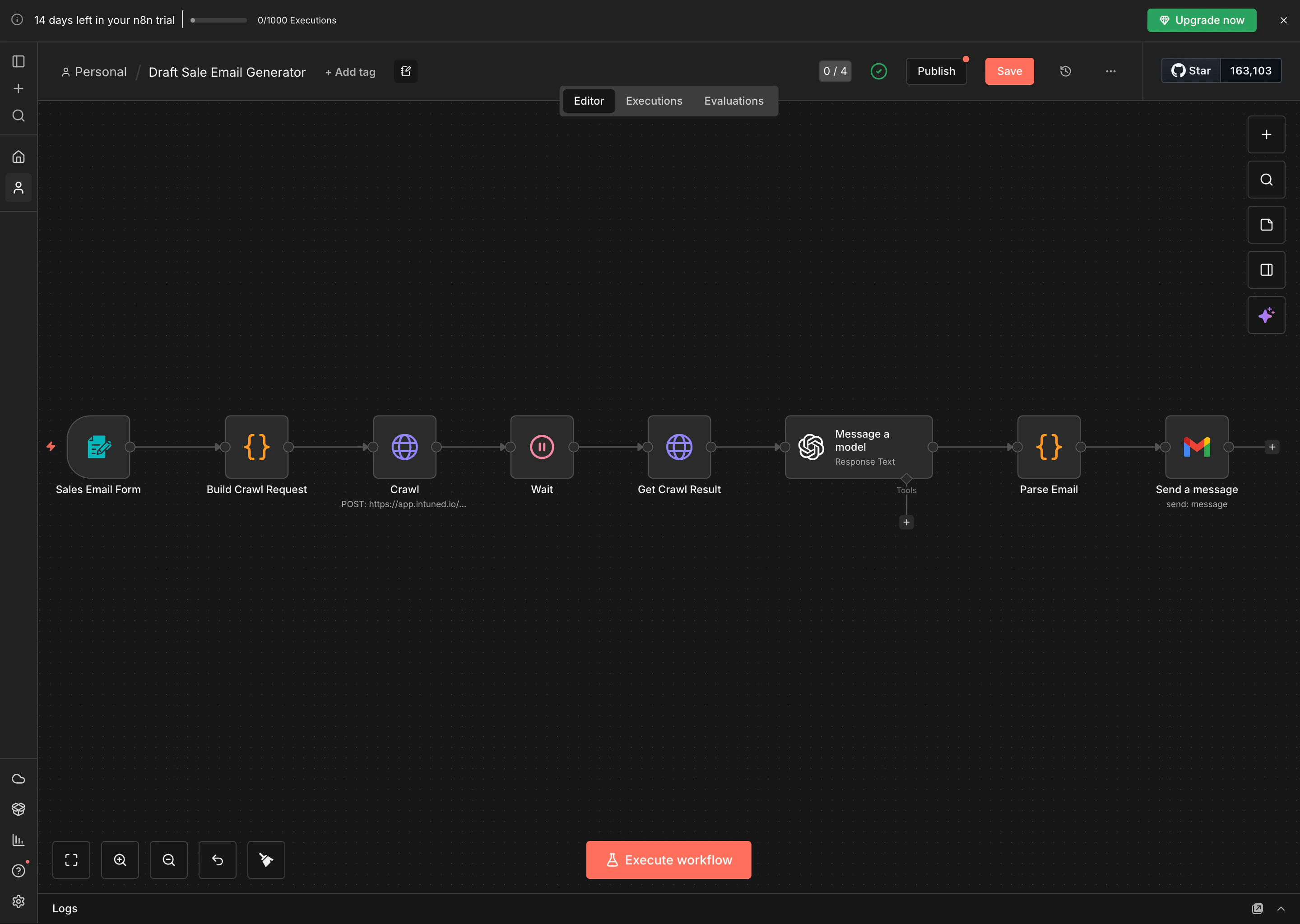 **Data flow:**
1. **Sales Email Form** - Form trigger that collects user input (product details, target company URL, recipient info)
2. **Build Crawl Request** - JavaScript code node that formats the request for Intuned's API
3. **Crawl (HTTP Request)** - Calls Intuned's API to start crawling the target company website
4. **Wait** - Pauses for 120 seconds to allow the crawl to complete (accounts for queue time + execution time)
5. **Get Crawl Result (HTTP Request)** - Fetches the crawled data from Intuned
6. **Message a model (OpenAI)** - Sends the crawled content + form inputs to GPT-4 to generate a personalized email
7. **Parse Email** - JavaScript code node that extracts subject and body from the AI response
8. **Send a message (Gmail)** - Sends the generated email via Gmail
### 4. Configure the Intuned API connection
Open the **Crawl** HTTP Request node and update the configuration:
1. **URL**: Replace `YOUR_WORKSPACE_ID` with your actual workspace ID:
```
https://app.intuned.io/api/v1/workspace/{YOUR_WORKSPACE_ID}/projects/crawl4ai/run/start
```
2. **Headers**: Replace `YOUR_API_KEY` with your Intuned API key:
```
x-api-key: YOUR_API_KEY
```
3. **Body Parameters**: These are already configured to pass the crawl request from the previous node
**Data flow:**
1. **Sales Email Form** - Form trigger that collects user input (product details, target company URL, recipient info)
2. **Build Crawl Request** - JavaScript code node that formats the request for Intuned's API
3. **Crawl (HTTP Request)** - Calls Intuned's API to start crawling the target company website
4. **Wait** - Pauses for 120 seconds to allow the crawl to complete (accounts for queue time + execution time)
5. **Get Crawl Result (HTTP Request)** - Fetches the crawled data from Intuned
6. **Message a model (OpenAI)** - Sends the crawled content + form inputs to GPT-4 to generate a personalized email
7. **Parse Email** - JavaScript code node that extracts subject and body from the AI response
8. **Send a message (Gmail)** - Sends the generated email via Gmail
### 4. Configure the Intuned API connection
Open the **Crawl** HTTP Request node and update the configuration:
1. **URL**: Replace `YOUR_WORKSPACE_ID` with your actual workspace ID:
```
https://app.intuned.io/api/v1/workspace/{YOUR_WORKSPACE_ID}/projects/crawl4ai/run/start
```
2. **Headers**: Replace `YOUR_API_KEY` with your Intuned API key:
```
x-api-key: YOUR_API_KEY
```
3. **Body Parameters**: These are already configured to pass the crawl request from the previous node
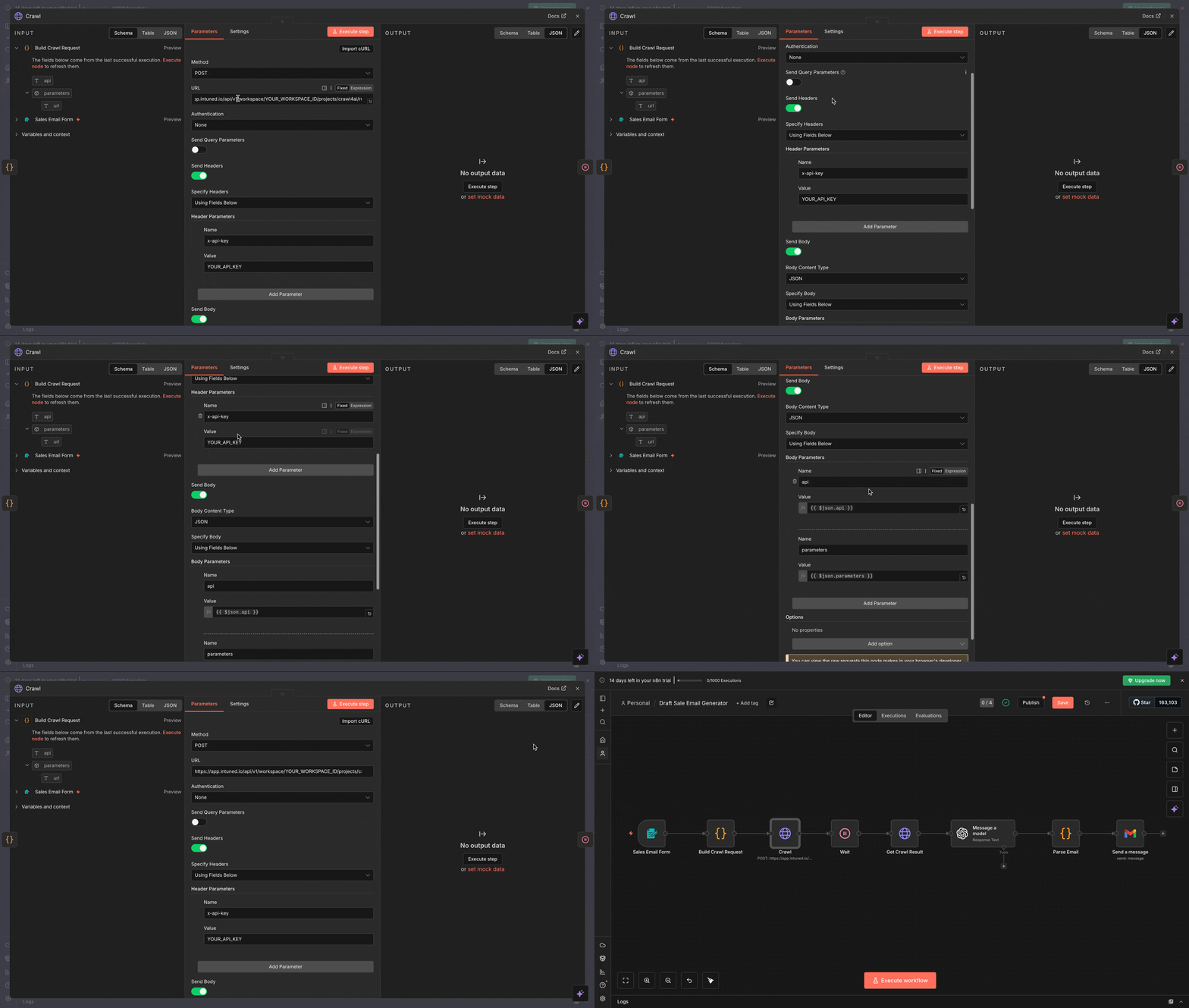 Store your API key in n8n's credentials manager instead of hardcoding it. Create a new **Header Auth** credential with name `x-api-key` and your API key as the value.
Open the **Get Crawl Result** HTTP Request node and update:
1. **URL**: Replace `YOUR_WORKSPACE_ID` with your workspace ID:
```
https://app.intuned.io/api/v1/workspace/{YOUR_WORKSPACE_ID}/projects/crawl4ai/run/{{ $json.runId }}/result/
```
Note: `{{ $json.runId }}` is dynamic and comes from the Crawl node response
2. **Headers**: Use the same API key as the Crawl node
The **Build Crawl Request** node formats the API request for Intuned. Here's what it does:
```javascript theme={null}
return {
json: {
api: "simple-crawl",
parameters: {
url: $input.item.json["Target company website"]
}
}
};
```
This code:
* Sets the API to `"simple-crawl"` (the crawl4ai project's main API)
* Passes the target URL from the form input
* Formats it as the JSON body Intuned expects
You can customize this to use different Intuned APIs or pass additional parameters based on your project.
### 5. Configure OpenAI and Gmail credentials
1. Open the **Message a model** node
2. Select **Create New Credential** under OpenAI API
3. Enter your OpenAI API key
4. Save the credential
See [n8n's OpenAI documentation](https://docs.n8n.io/integrations/builtin/credentials/openai/) for detailed setup instructions.
1. Open the **Send a message** node
2. Select **Create New Credential** under Gmail OAuth2
3. Follow n8n's OAuth flow to authorize your Gmail account
4. Save the credential
See [n8n's Gmail documentation](https://docs.n8n.io/integrations/builtin/credentials/google/) for detailed setup instructions.
### 6. Test the workflow
1. Select **Execute workflow** in the bottom to enable the workflow
2. A UI form on another tab will open automatically
3. Fill in the form with test data:
* **What are you selling?**: "Developer productivity platform for automated code reviews and testing"
* **Target company website**: "[https://github.com](https://github.com)"
* **Job title**: "VP of Engineering"
* **Recipient email**: Your test email address
* Fill in remaining fields
4. Submit the form and watch the workflow execute
Store your API key in n8n's credentials manager instead of hardcoding it. Create a new **Header Auth** credential with name `x-api-key` and your API key as the value.
Open the **Get Crawl Result** HTTP Request node and update:
1. **URL**: Replace `YOUR_WORKSPACE_ID` with your workspace ID:
```
https://app.intuned.io/api/v1/workspace/{YOUR_WORKSPACE_ID}/projects/crawl4ai/run/{{ $json.runId }}/result/
```
Note: `{{ $json.runId }}` is dynamic and comes from the Crawl node response
2. **Headers**: Use the same API key as the Crawl node
The **Build Crawl Request** node formats the API request for Intuned. Here's what it does:
```javascript theme={null}
return {
json: {
api: "simple-crawl",
parameters: {
url: $input.item.json["Target company website"]
}
}
};
```
This code:
* Sets the API to `"simple-crawl"` (the crawl4ai project's main API)
* Passes the target URL from the form input
* Formats it as the JSON body Intuned expects
You can customize this to use different Intuned APIs or pass additional parameters based on your project.
### 5. Configure OpenAI and Gmail credentials
1. Open the **Message a model** node
2. Select **Create New Credential** under OpenAI API
3. Enter your OpenAI API key
4. Save the credential
See [n8n's OpenAI documentation](https://docs.n8n.io/integrations/builtin/credentials/openai/) for detailed setup instructions.
1. Open the **Send a message** node
2. Select **Create New Credential** under Gmail OAuth2
3. Follow n8n's OAuth flow to authorize your Gmail account
4. Save the credential
See [n8n's Gmail documentation](https://docs.n8n.io/integrations/builtin/credentials/google/) for detailed setup instructions.
### 6. Test the workflow
1. Select **Execute workflow** in the bottom to enable the workflow
2. A UI form on another tab will open automatically
3. Fill in the form with test data:
* **What are you selling?**: "Developer productivity platform for automated code reviews and testing"
* **Target company website**: "[https://github.com](https://github.com)"
* **Job title**: "VP of Engineering"
* **Recipient email**: Your test email address
* Fill in remaining fields
4. Submit the form and watch the workflow execute
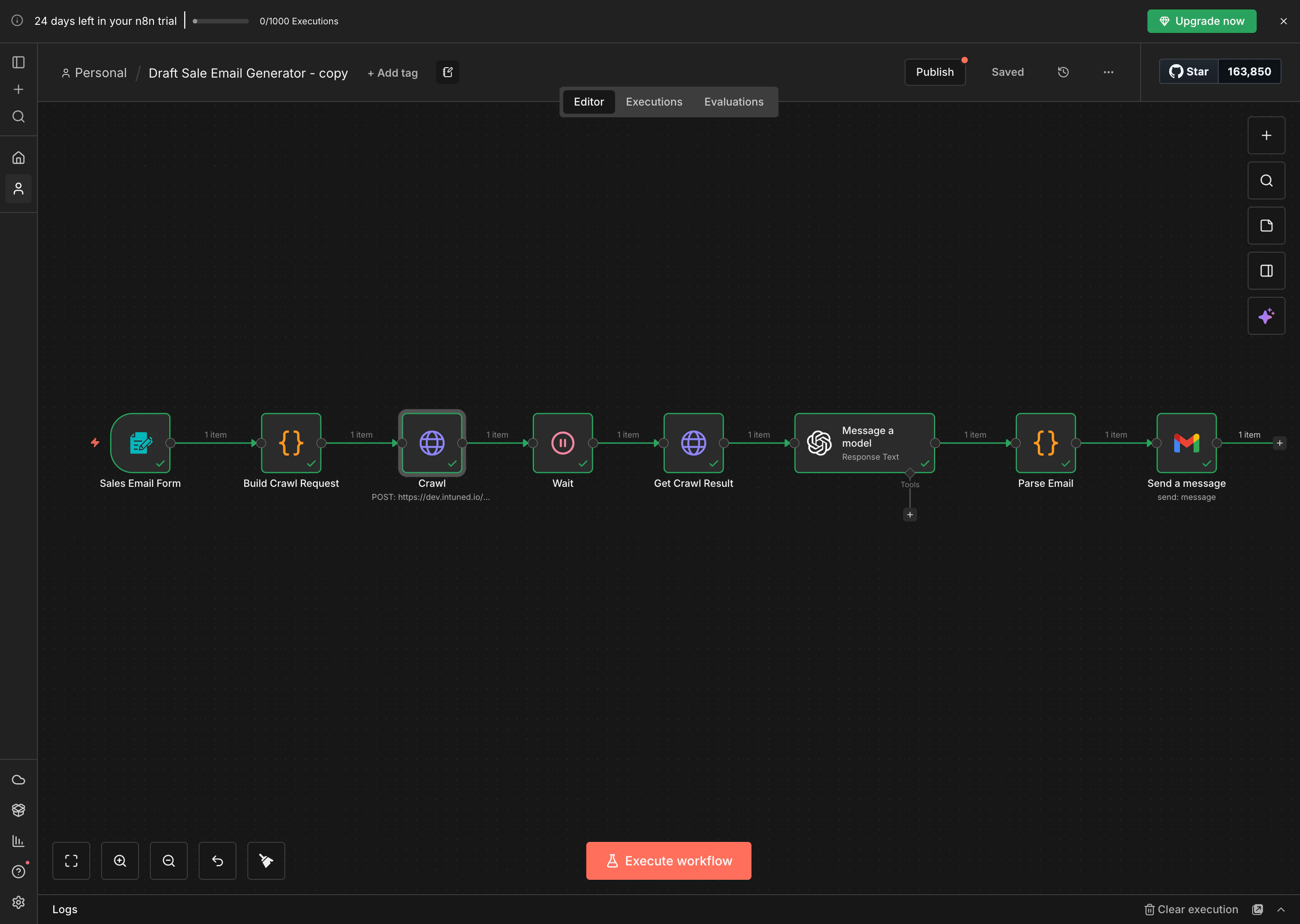 In n8n's execution view, you can:
* See the data output from each node
* Verify the Crawl node received a `runId`
* Check that Get Crawl Result returned markdown content
* Review the AI-generated email in the Parse Email node
* Confirm the email was sent successfully
You can also monitor Run status and view logs in the Intuned dashboard. See [Observability and monitoring](/main/02-features/observability-monitoring-logs) for details.
1. Open your test email inbox
2. You should receive a personalized sales email
3. The email content should reference information from the target website
4. Review the subject line and body for quality
## Best practices
* **Use environment variables**: Store API keys and workspace IDs in n8n's credentials manager or environment variables, never hardcode them.
* **Adjust wait times**: The 120-second wait accounts for both queue time and crawl execution. Complex pages or busy projects may need longer. See [Runs](/main/02-features/runs-single-executions) for how concurrency and queuing work.
* **Handle errors**: Add error workflows in n8n to handle API failures, timeout issues, or invalid crawl results gracefully.
* **Monitor in Intuned dashboard**: Check the Intuned dashboard to review Runs, debug failures, and monitor usage. See [Observability and monitoring](/main/02-features/observability-monitoring-logs).
* **Consider webhooks for production**: For long-running crawls, use Intuned's async webhook sinks instead of the Wait node to avoid blocking your workflow.
## Related resources
* **[Intuned Projects](/main/03-how-to/solve/structure-intuned-projects)** — Learn how to structure and manage your Intuned projects
* **[API Reference](/client-apis/api-reference)** — Complete API documentation for all Intuned endpoints
* **[Cookbook examples](https://github.com/Intuned/cookbook)** — Explore more browser automation projects and examples
* **[n8n HTTP Request docs](https://docs.n8n.io/integrations/builtin/core-nodes/n8n-nodes-base.httprequest/)** — Official n8n documentation for HTTP Request nodes
In n8n's execution view, you can:
* See the data output from each node
* Verify the Crawl node received a `runId`
* Check that Get Crawl Result returned markdown content
* Review the AI-generated email in the Parse Email node
* Confirm the email was sent successfully
You can also monitor Run status and view logs in the Intuned dashboard. See [Observability and monitoring](/main/02-features/observability-monitoring-logs) for details.
1. Open your test email inbox
2. You should receive a personalized sales email
3. The email content should reference information from the target website
4. Review the subject line and body for quality
## Best practices
* **Use environment variables**: Store API keys and workspace IDs in n8n's credentials manager or environment variables, never hardcode them.
* **Adjust wait times**: The 120-second wait accounts for both queue time and crawl execution. Complex pages or busy projects may need longer. See [Runs](/main/02-features/runs-single-executions) for how concurrency and queuing work.
* **Handle errors**: Add error workflows in n8n to handle API failures, timeout issues, or invalid crawl results gracefully.
* **Monitor in Intuned dashboard**: Check the Intuned dashboard to review Runs, debug failures, and monitor usage. See [Observability and monitoring](/main/02-features/observability-monitoring-logs).
* **Consider webhooks for production**: For long-running crawls, use Intuned's async webhook sinks instead of the Wait node to avoid blocking your workflow.
## Related resources
* **[Intuned Projects](/main/03-how-to/solve/structure-intuned-projects)** — Learn how to structure and manage your Intuned projects
* **[API Reference](/client-apis/api-reference)** — Complete API documentation for all Intuned endpoints
* **[Cookbook examples](https://github.com/Intuned/cookbook)** — Explore more browser automation projects and examples
* **[n8n HTTP Request docs](https://docs.n8n.io/integrations/builtin/core-nodes/n8n-nodes-base.httprequest/)** — Official n8n documentation for HTTP Request nodes